
What does Apple RoomPlan detect?
Short answer
RoomPlan detects five kinds of surfaces (walls, doors marked open or closed, windows, openings and floors), 16 kinds of objects from beds and sofas to stoves, toilets and stairs, each as a box with its size, and five room types: living room, bedroom, bathroom, kitchen and dining room.[1][2][3]
RoomPlan is the Apple framework that PlaceAnew and many other iPhone room scanners are built on. It uses the camera, the LiDAR Scanner and trained models to describe a room.[4] Knowing exactly what it sees tells you what any RoomPlan app can measure, and where an app has to add its own work.
Surfaces: the room's shell
| Surface | What you get |
|---|---|
| Wall | Its size and position. Since iOS 17, slanted walls, curved walls and walls with a beam are handled, with the wall described as a polygon. |
| Door | Size and position, and whether it was open or closed when scanned. |
| Window | Size and position in its wall. |
| Opening | A gap in a wall with no door, such as an archway or a pass-through. |
| Floor | Since iOS 17, the floor's outline as a polygon. |
Every surface and object also carries a confidence level, one of three, so an app knows how sure RoomPlan was.[4]
Objects: the 16 kinds of furniture and fixtures
| Group | RoomPlan categories |
|---|---|
| Seating and tables | Sofa, chair, table |
| Bedroom and storage | Bed, storage |
| Kitchen | Refrigerator, stove, oven, dishwasher, sink |
| Bathroom and laundry | Toilet, bathtub, washer or dryer |
| Living room | Television, fireplace |
| Building | Stairs |
Since iOS 17 RoomPlan also tells shapes apart within a kind, for example a single seat from an L-shaped sofa, and handles recessed dishwashers, ovens and sinks in kitchen runs.[5]
Room types: five labels
Since iOS 17, RoomPlan can mark an area as a living room, bedroom, bathroom, kitchen or dining room, or leave it unidentified. One open space can carry two labels, such as kitchen and dining room.[3]
What RoomPlan does not detect
- Hallways, offices, laundries, closets, garages or a separate toilet as room types: only the five labels above exist.[3]
- Desks, shelves, lamps, rugs, mirrors or artwork as their own kinds: they are outside the 16 categories.[2]
- Outlets, switches, vents and pipes.
- Colours and materials. Surfaces and objects come with sizes, not finishes.
- A ceiling surface. The surface categories are wall, door, window, opening and floor.[1]
What PlaceAnew adds on top
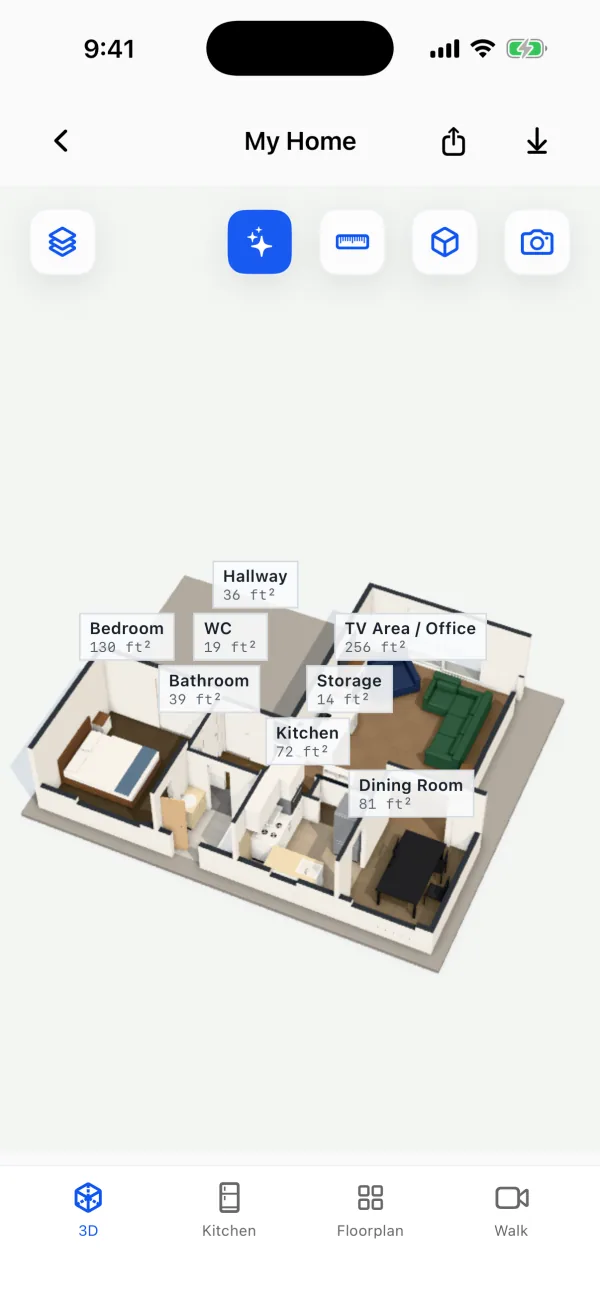
- A finished floor plan: walls straightened and joined, square footage for every room and the total, doors with their swings.
- More room names: from the bathroom fixtures, RoomPlan's label, the furniture (a bed, a washer, an oven) and the shape (a long narrow room is a hallway); see how rooms get named.
- Furniture you can read: plan symbols and 3D furniture instead of grey boxes.
- Floor colours read from the video of your scan, marked as an estimate when PlaceAnew is not sure of the floor type.
- Honest gaps: walls the scan could not see are drawn dashed.
- Fix with AI In testing: reads the scan's photos to name rooms, tidy walls and recognize furniture; see AI floor plan cleanup.
- Exports: PDF report, SVG drawing, DXF for CAD and USDZ 3D model.
Questions people ask
Which devices run RoomPlan?
Does RoomPlan measure ceiling height?
Yes, through each wall's height. There is no separate ceiling surface, and very high ceilings can be beyond the sensor's range.[4]
Can RoomPlan scan more than one room?
Yes, since iOS 17. See how RoomPlan scans multiple rooms.
What file does RoomPlan make?
Apple's framework exports USD or USDZ.[4] PlaceAnew adds a floor plan PDF, an SVG and a DXF, and its own 3D model as USDZ.
Sources
- CapturedRoom.Surface.Category (RoomPlan documentation). Apple Developer, 2022. Official documentation.
- CapturedRoom.Object.Category (RoomPlan documentation). Apple Developer, 2022. Official documentation.
- CapturedRoom.Section and CapturedRoom.Section.Label (RoomPlan documentation). Apple Developer, 2023. Official documentation.
- Create parametric 3D room scans with RoomPlan (WWDC22 session 10127). Apple Developer, June 2022. Official documentation.
- Explore enhancements to RoomPlan (WWDC23 session 10192). Apple Developer, June 2023. Official documentation.
- RoomCaptureSession.isSupported (RoomPlan documentation). Apple Developer, 2022. Official documentation.
- Models with a LiDAR Scanner (iPhone User Guide, iOS 27). Apple Support, 2026. Official documentation.
Last reviewed November 8, 2026 by the PlaceAnew team at US Construction Remodeling Corp., a licensed California contractor (CSLB License #1117562).