
Can AI clean up a scanned floor plan?
Short answer
Yes, and most of the cleanup does not even need AI. PlaceAnew already straightens walls, names rooms from their fixtures and shape, and marks what it could not see. Fix with AI, now in testing with a small group, goes further: it reads the photos from your scan to name rooms and areas, tidy walls and recognize furniture, and marks what it estimated.
A phone scan measures well but describes the house like a machine: boxes instead of furniture, a handful of room types, walls a little off square. Cleaning that up by hand is the redraw everyone hoped scanning would remove. Here is what gets cleaned, who does it, and what is still in testing.
What does a raw scan get wrong?
- Room names. Apple's RoomPlan labels an area as a living room, bedroom, bathroom, kitchen or dining room, or leaves it unidentified.[1] There is no hallway, office, laundry, closet or separate toilet.
- Furniture. Every piece is a box with a size, in 16 kinds such as table, chair, storage and sofa.[2][3] A desk is a "table" and a run of kitchen cabinets is "storage".
- Walls. Wall thickness and small drift between rooms are the known weak points of RoomPlan apps, in a 2026 peer-reviewed study of an app built on the same technology.[4]
- Hidden parts. LiDAR sees surfaces, not through them, so a wall behind a wardrobe was never measured.
What PlaceAnew cleans up today, without AI
This runs on the phone the moment the scan ends, for everyone:
- Walls straightened and joined into a clean plan.
- Rooms named from the bathroom fixtures first (a tub or shower makes a bathroom; a toilet alone in a small room, a toilet room), then RoomPlan's own label, then the furniture (a bed a bedroom, a washer a laundry), then the shape (a long, narrow room is a hallway). A room nothing identifies keeps a numbered name.
- Furniture drawn as plan symbols and as furniture in 3D, not grey boxes.
- Gaps shown, not hidden. A wall the scan could not see is drawn dashed; anything estimated says "estimate".
- An editor for the rest: move a wall, change a door, rename a room. Your own names always win, and earlier versions are kept.
What Fix with AI adds (in testing)
In testing Fix with AI is being tried with a small group first and may not appear in your app yet. It reads the photos taken during your scan alongside the measured scan, and then:
- Names rooms and the areas inside them the way a person would, from what is really there.
- Tidies walls the scan left rough.
- Recognizes furniture from the photos, not just its box.
- Marks its estimates. What the AI could not confirm is labelled as an estimate, like everything else in PlaceAnew.
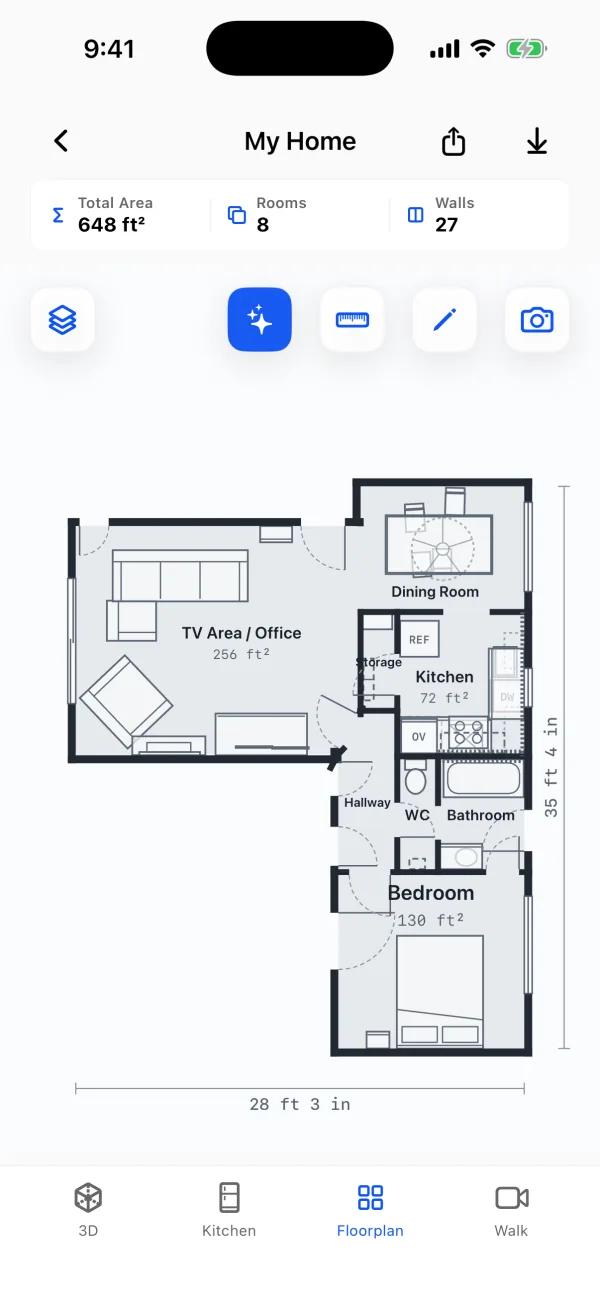
The sample home above is the app's own result with Fix with AI applied. "TV Area / Office", "WC" and "Storage" are names none of RoomPlan's five room labels could give: the living room holds both a TV corner and a desk, so it says so. More on this in how AI names the rooms of a floor plan.
Cleanup by hand, by rules, by AI
| Job | Who does it in PlaceAnew |
|---|---|
| Straight, joined walls | The app, automatically, for every scan. |
| Kitchen, bathroom, bedroom, hallway, laundry, office | The app's rules, from RoomPlan's label, the fixtures and the shape. |
| Names like TV area, storage, WC, and two uses in one room | Fix with AI, from the photos (in testing). |
| Walls hidden behind furniture | Drawn dashed by the app, so you know to check them; fix them in the editor. |
| Anything you know better | You, in the editor. Your edits always win. |
Can I build from an AI-cleaned plan?
Plan, price and design from it, yes. Build from it, only after a tape check: the room layout from a RoomPlan scan is reliable, and in the 2026 study it came within about 5% of a laser scanner's total room area,[4] but AI makes the plan readable, not more precise than the sensor. Measure anything you will cut, order or fabricate.
What happens to my photos?
Scanning, the plan and the 3D model are processed on your device. Fix with AI works on your scan's photos, and the app will say clearly when it is available to you and what it does with your data before you use it. See the privacy policy.
Questions people ask
Is Fix with AI available to everyone?
Not yet. It is in testing with a small group and may not appear in your app. Everything else on this page, the wall straightening, the rule-based room names, dashed walls and the editor, works for everyone today.
Will AI change my measurements?
Fix with AI works from the scan's measurements. Where it fills in something the scan could not see, it marks it as an estimate, so you always know what was measured and what was not.
Can I undo what the AI did?
Yes. Rename any room or move any wall in the editor; your edits win, and earlier versions of the plan are kept.
Does it work on any floor plan, or only PlaceAnew scans?
Only on scans made with PlaceAnew, because it uses the scan's measurements and photos together.
Sources
- CapturedRoom.Section and CapturedRoom.Section.Label (RoomPlan documentation). Apple Developer, 2023. Official documentation.
- Create parametric 3D room scans with RoomPlan (WWDC22 session 10127). Apple Developer, June 2022. Official documentation.
- CapturedRoom.Object.Category (RoomPlan documentation). Apple Developer, 2022. Official documentation.
- A Comparative Study of Mobile Device and Terrestrial Laser Scanning-Based Scan-to-BIM Workflows (Ersoz and Bosché). ISARC 2026 proceedings, IAARC, 2026. Peer-reviewed study.
Last reviewed November 8, 2026 by the PlaceAnew team at US Construction Remodeling Corp., a licensed California contractor (CSLB License #1117562).