
Can AI automatically name rooms in a floor plan?
Short answer
Yes, in three layers. Apple's RoomPlan recognizes five room types during the scan.[1] PlaceAnew then names every room it can from its fixtures, furniture and shape, such as bathroom, toilet, laundry, office or hallway. Fix with AI, now in testing with a small group, reads the scan's photos for names like WC, closet, entry or TV area / office.
A floor plan without room names is a puzzle. Typing them in by hand is quick for one room and tedious for a house, and it is the step most people skip. Here is how room names get onto a scanned plan automatically, which names each layer can give, and where AI is still being tested.
Layer 1: what the scan itself recognizes
Since iOS 17, Apple's RoomPlan can mark an area of the scan as a living room, bedroom, bathroom, kitchen or dining room, or leave it unidentified. One open space can carry two labels, such as kitchen and dining room.[1] The label comes from the scan itself, on the phone. It has no hallway, office, laundry, closet or separate toilet.
Layer 2: PlaceAnew's naming rules, for everyone
When the scan ends, PlaceAnew names each room the way a person reading the plan would, in this order:
- Bathroom fixtures decide first. A tub or shower makes a bathroom. A toilet alone in a very small room makes a separate toilet room, which stays its own room.
- Then RoomPlan's own label, if it gave one.
- Then the furniture. A bed makes a bedroom, a washer or dryer a laundry, an oven or stove a kitchen, a sofa, TV or fireplace a living room, a table with chairs a dining room, and several tables with a chair each an office.
- Then the shape. A long, narrow, empty space is a hallway.
- Nothing fits? The room keeps a numbered name rather than a wrong guess.
Your own name always wins. Rename any room in the editor and PlaceAnew never overrides it.
Layer 3: Fix with AI In testing
Fix with AI is being tried with a small group first and may not appear in your app yet. It looks at the photos taken during your scan together with the measured plan, and names rooms from what is really there, including names no rule can give:
| Kind of space | Names Fix with AI can give |
|---|---|
| Bath | Bathroom, Half Bath, WC |
| Kitchen and living | Kitchen, Kitchenette, Dining Room, Living Room, TV Area |
| Private | Bedroom, Closet |
| Circulation | Hallway, Entry, Stairs, Open Area |
| Work and storage | Office, Storage, Laundry, Utility Room, Garage |
| Business | Reception, Conference Room, Break Room, Storefront, Bar |
A room used two ways gets both names, such as "TV Area / Office".
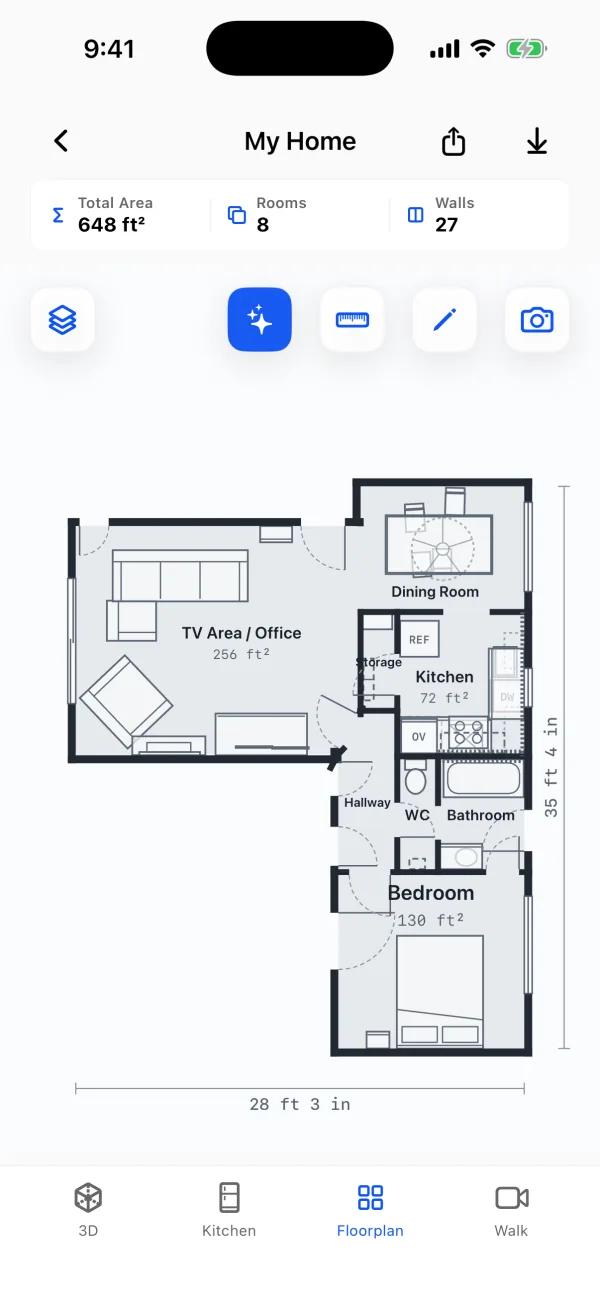
The sample home above is the app's own result. "TV Area / Office", "WC" and "Storage" come from the photos; none of RoomPlan's five labels could give them. For walls and furniture, see AI floor plan cleanup.
Why automatic names matter
- The plan reads at a glance for a client, a buyer or a crew who has never been in the house.
- Square footage by room becomes useful: an area next to "Bedroom" means something, next to "Room 3" it does not.
- Exports carry the names. The PDF, SVG and DXF all show the same room names as the app.
Can I trust the names?
Check them like you would check a colleague's sketch. The rules only name a room when the evidence is clear, and leave it numbered otherwise. Fix with AI marks what it could not confirm as an estimate. Either way, one tap in the editor renames a room, and your name stays.
Questions people ask
Is Fix with AI available to everyone?
Not yet. It is in testing with a small group. The rule-based names work for everyone today.
Does naming need an internet connection?
RoomPlan's labels and PlaceAnew's rules run on the phone. Fix with AI works on your scan's photos, and the app will say what it does with your data before you use it; see the privacy policy.
Will it merge a separate toilet into the bathroom?
No. Rooms separated by walls stay separate rooms, and a toilet room keeps its own name.
Can it name rooms on a plan I drew myself?
No. Naming works on PlaceAnew scans, because it uses what the scan found in each room.
Sources
- CapturedRoom.Section and CapturedRoom.Section.Label (RoomPlan documentation). Apple Developer, 2023. Official documentation.
Last reviewed November 8, 2026 by the PlaceAnew team at US Construction Remodeling Corp., a licensed California contractor (CSLB License #1117562).