
Can RoomPlan scan multiple rooms?
Short answer
Yes. Since iOS 17, RoomPlan can scan room after room in one shared coordinate space and merge them into a single structure. Apple says this works best for single-floor homes up to about 2,000 square feet.[1] PlaceAnew uses it so you walk a whole floor in one scan and get one plan, with every room named and measured.
The first RoomPlan, in 2022, was built for one room at a time, up to 30 by 30 feet.[2] A floor plan of a home needs more than that. Here is what changed, how multi-room scanning works under the hood, and what it means when you hold the phone.
How RoomPlan scans more than one room
Apple introduced multi-room scanning with iOS 17.[3] The rooms are captured into one structure, which Apple calls a CapturedStructure, so walls, doors, windows and objects line up across rooms.[4] Apple describes two ways to keep every room in the same coordinates:[1]
| Approach | When it fits |
|---|---|
| Continuous session: the tracking keeps running from one room to the next | Scanning the rooms in one visit, walking from room to room. |
| Relocalization: a saved map lets a later scan find its place again | Scanning rooms on different days and adding them to the same home. |
Apple's documentation adds that a structure can hold rooms with varying floor heights and rooms on different floors.[4]
Apple's limits for multi-room scans
- Size: best for single-floor homes with one to four bedrooms, living room, kitchen and dining room, up to about 2,000 square feet in total.[1]
- Light: at least 50 lux, about a family living room at night.[2]
- Time: no single scan over 5 minutes, because of battery drain and heat.[2]
- Hard surfaces: full-height mirrors and glass, very dark surfaces and high ceilings.[2]
How PlaceAnew does it: one walk per floor
In PlaceAnew you do not scan room by room and press "next room". You start once and keep walking through open doors; the scan follows you, so the hallway, every room and the doors between them come out in one plan with one set of coordinates. When you finish, PlaceAnew draws the floor plan: walls straightened, rooms named with their square footage, doors and windows in place.
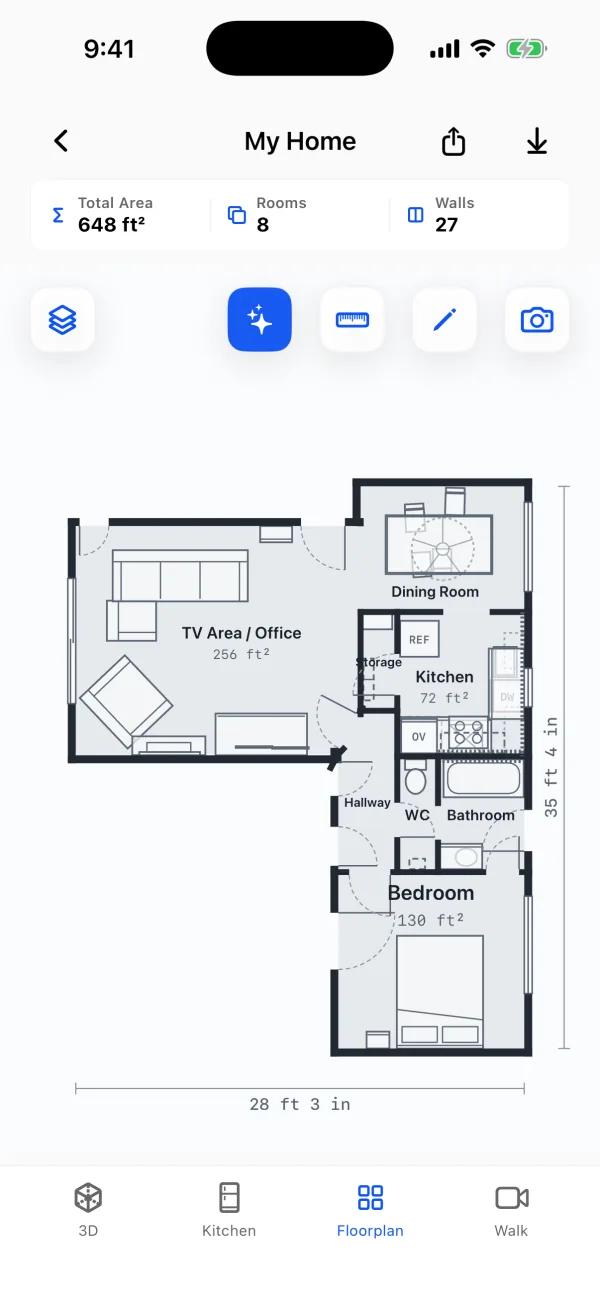
The sample home in these screens is one walk: 8 rooms, 648 ft², and a Walk recording of 3 minutes 23 seconds.
For houses with more than one floor, PlaceAnew scans each floor as its own scan, so each floor gets its own clean plan, 3D model and exports. Step-by-step route advice is in how to scan an entire house.
When a multi-room scan goes wrong
| Problem | Fix |
|---|---|
| The scan loses its place in a doorway or hallway | Slow down, point the camera at a corner or furniture, and give it a moment to find its position again before walking on. |
| A room is missing | It was skipped or walked past too quickly. Scan the floor again, entering every room and circling it. |
| Rooms do not quite line up at the far end | Small drift between rooms is the known weak point of RoomPlan apps.[5] Check one long overall dimension with a laser meter if the drawing must close exactly. |
| A wall behind a mirror or glass is missing | Mirrors and glass are hard for LiDAR.[2] PlaceAnew draws the wall dashed; correct it in the editor. |
How good is a multi-room RoomPlan scan?
In a 2026 peer-reviewed study, an app built on the same Apple RoomPlan technology scanned a house and two office floors. It found all 8 rooms of the house, its total room area came within about 5% of a terrestrial laser scanner's model, and room shapes overlapped that model with a score of 0.84 in the house and up to 0.93 in an office.[5] The whole job took 32 minutes, against 20 hours for the laser scanner and manual modelling.[5]
Questions people ask
Which iOS version does multi-room scanning need?
Can RoomPlan scan two floors into one model?
The framework can hold rooms on different floors in one structure.[4] PlaceAnew keeps one floor per scan, so each floor has its own plan and exports.
Do I need to close the doors between rooms?
For a single-room scan, Apple suggests closing doors so the scan stays in the room.[2] For a whole floor in PlaceAnew, open them so the scan can follow you.
Is multi-room scanning a developer feature or something I can use?
It is a developer framework; you use it through an app. In PlaceAnew it is simply how scanning works: start, walk the floor, finish.
Sources
- Explore enhancements to RoomPlan (WWDC23 session 10192). Apple Developer, June 2023. Official documentation.
- Create parametric 3D room scans with RoomPlan (WWDC22 session 10127). Apple Developer, June 2022. Official documentation.
- CapturedStructure (RoomPlan documentation). Apple Developer, 2023. Official documentation.
- Scanning the rooms of a single structure (RoomPlan documentation). Apple Developer, 2023. Official documentation.
- A Comparative Study of Mobile Device and Terrestrial Laser Scanning-Based Scan-to-BIM Workflows (Ersoz and Bosché). ISARC 2026 proceedings, IAARC, 2026. Peer-reviewed study.
- RoomCaptureSession.isSupported (RoomPlan documentation). Apple Developer, 2022. Official documentation.
Last reviewed November 8, 2026 by the PlaceAnew team at US Construction Remodeling Corp., a licensed California contractor (CSLB License #1117562).