
What is a LiDAR scanner, and what does the one in your iPhone measure?
Short answer
A LiDAR scanner measures distance with pulses of laser light: it records each reflection and turns them into points in 3D.[1] Every iPhone Pro and Pro Max since the iPhone 12 Pro, and the iPad Pro, has one that reaches up to 5 meters.[2][3] PlaceAnew uses it to measure a home and draw its floor plan and 3D model.
Reviewed 13 sources7 min read
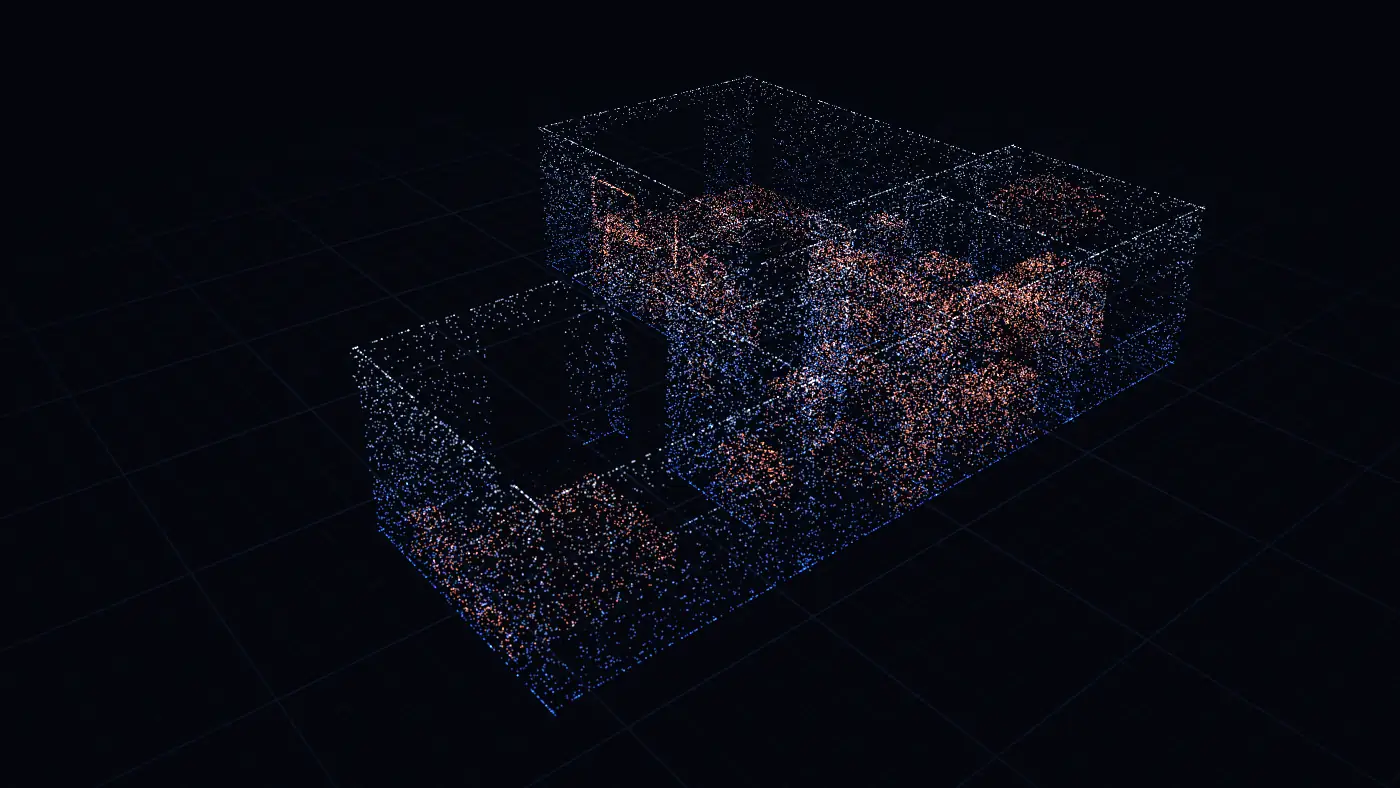
LiDAR stands for Light Detection and Ranging. NOAA, which maps the ground with it from the air, defines it as a way of measuring distance with light in the form of a pulsed laser.[1] The same idea now sits in your pocket: on Pro iPhones and iPads, the LiDAR Scanner is the small dark circle next to the camera lenses.
It is the reason a phone can measure a whole room by itself. Without it, an app can only ask you to tap corners or type the numbers from a tape.
How does a LiDAR scanner work?
- It sends out pulses of light. In a phone you never see them; Apple says the scanner works at the photon level, at nanosecond speeds.[3]
- It records each reflection. The light bounces off the first surface it meets, a wall, a cabinet, a sofa, and the sensor measures how far away that surface is.
- It builds points in 3D. Each reflection becomes a point. Together they make a dense set of points with a position each, which surveyors call a point cloud.[1]
- Software reads the points. On an iPhone, Apple's RoomPlan combines the LiDAR readings with the camera and trained models to find the walls, windows, openings and doors and recognize the furniture and appliances.[4]
What kinds of LiDAR scanners are there?
| Kind | Where it works | What it gives |
|---|---|---|
| Airborne LiDAR | On a plane or drone, over land and coast | Elevation maps, terrain and building models |
| Tripod (terrestrial) laser scanner | Set up again and again through a building | A point cloud of every surface, for CAD and building models |
| Phone or tablet LiDAR Scanner | In your hand on a Pro iPhone or iPad Pro, as you walk | With an app like PlaceAnew: a measured floor plan, a 3D model with furniture, and a PDF and DXF |
The difference is cost and time. A 2024 study set a $900 iPad Pro against a $20,000 tripod laser scanner indoors.[5] In a 2026 study, an iPad with a RoomPlan app went from scan to building model in 32 minutes, where tripod scanning plus modelling by hand took 20 hours.[6]
Which iPhones and iPads have a LiDAR scanner?
| Device | LiDAR Scanner |
|---|---|
| iPhone 12 Pro through iPhone 18 Pro, Pro and Pro Max | Yes |
| iPad Pro, 2020 and later | Yes |
| Standard, Plus, mini, SE, e, Air and Duo iPhones | No |
Not sure which iPhone you have? Open Settings › General › About and read the Model Name. Every model, one by one, is in which iPhones have LiDAR. PlaceAnew runs on iPhone 12 Pro or a newer Pro model, or an iPad Pro from 2020 or later.
How far can the iPhone's LiDAR scanner measure?
Apple says the LiDAR Scanner measures the distance to objects up to 5 meters away, about 16 feet, indoors and outdoors.[3] That covers a room from the middle. For bigger spaces you walk: the scanner measures each wall as you pass it, and RoomPlan joins them into one plan.
Apple's guidance for room scanning: rooms up to 30 by 30 feet per room, at least 50 lux of light, and care around full-height mirrors and glass, which are hard for the sensor.[7] A whole single-floor home up to about 2,000 square feet scans in one walk.[8]
How close are its measurements?
Close enough to plan, price and design a home from:
- Our office test: PlaceAnew's plan from one walk put every wall that compares one to one with our hand-measured plan within 2.5 inches, median under 1 inch.[9]
- Walls and rooms in a 2026 study: an app built on the same Apple RoomPlan technology found every room in all three buildings it scanned, and its total wall area came within 2% of a laser-scanned model.[6]
- The sensor on its own: a 2024 study of the iPad Pro's LiDAR with a general scanning app found features up to about 13 feet long within 1 to 2 cm of a tripod scanner, while longer spans scanned on the move drifted by up to about a foot.[5]
That is why the walk matters more than the phone: one calm pass, lights on, doors open. PlaceAnew draws any wall it could not see dashed and marks what it estimated, and Walk replays your visit so you can look at a corner again. More in how accurate iPhone LiDAR is and LiDAR vs a tape measure.
What does a LiDAR scan of a home give you?
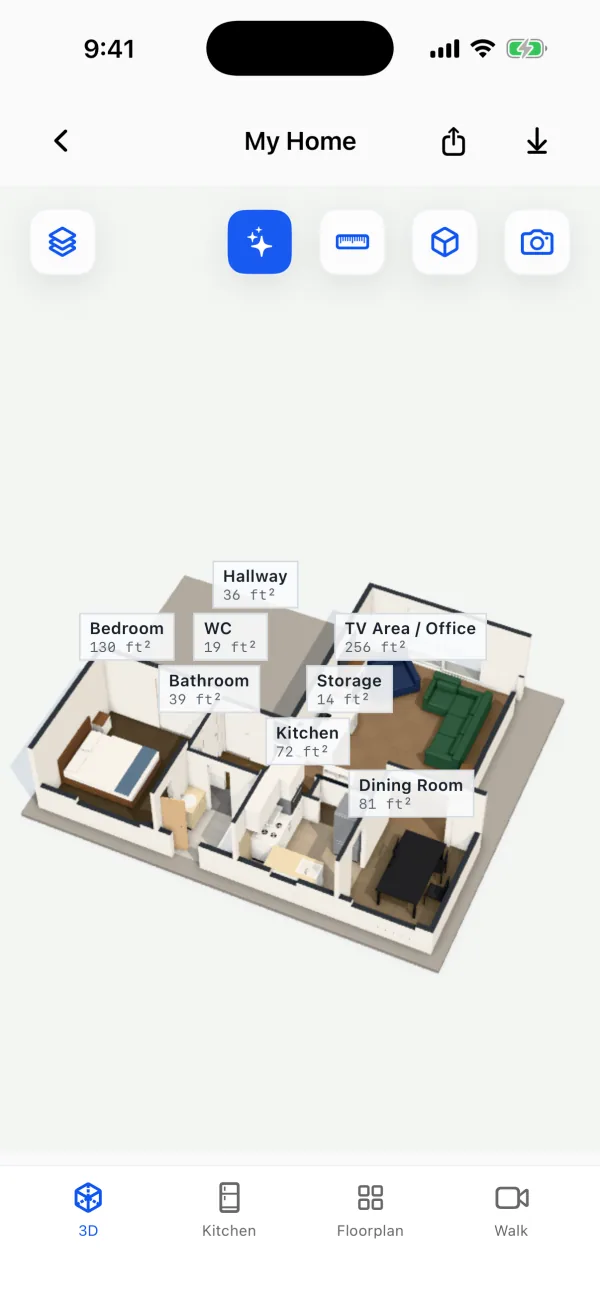
On its own, a scan is depth: points or a mesh of every surface. Apple's RoomPlan turns it into a model of the room: walls, doors, windows, openings and floors,[10] and objects such as beds, sofas, tables, toilets, bathtubs, sinks, stoves, refrigerators and dishwashers.[11] PlaceAnew turns that model into what you use:
- A floor plan with walls straightened, every room named and measured in square feet, and the total.
- A 3D model of the home with the furniture it recognized.
- Walk: the recording of your scan, lined up with the plan.
- A kitchen designer that opens on the scanned kitchen, with its real walls, doors and windows.
- Files: PDF report, SVG drawing, DXF for CAD and USDZ 3D model.
How does PlaceAnew turn a LiDAR scan into a floor plan and 3D?
- You walk. Open PlaceAnew, start a scan and walk room to room, sweeping the camera along the walls from floor to ceiling. The app outlines the walls, doors, windows and furniture as it finds them.
- RoomPlan reads the LiDAR. It finds each surface and object and gives each one a confidence level, high, medium or low.[12]
- PlaceAnew draws the plan. Walls straightened, rooms named and measured, doors and windows in place, fixtures and furniture drawn as plan symbols at their measured size.
- PlaceAnew builds the 3D. The same scan becomes the 3D model, with floor colors read from your recording.
- You share it. Send the PDF, the DXF or the 3D model from the app.
All of it happens on the phone, with no internet connection or account needed. With a free account, Fix with AI names rooms, tidies walls and recognizes furniture from the photos of your scan. The whole flow, as a floor plan maker, is in the floor plan maker that measures for you, and the plan it draws is explained in how to read a floor plan.
Which LiDAR scanner app should I use?
Pick by what you need at the end. For a home's floor plan, 3D model and DXF, PlaceAnew: Scanning, floor plans, 3D, editing, the kitchen designer with prices and exports are free. For textured 3D meshes, point clouds for CAD or scans of objects, other apps fit better. They are compared job by job in the best LiDAR scanner app for iPhone.
Questions people ask
What does LiDAR stand for?
Light Detection and Ranging: measuring distance with pulses of laser light.[1]
Does my iPhone have a LiDAR scanner?
If it is an iPhone 12 Pro or a later Pro or Pro Max, yes. The standard, Plus, mini, SE, e, Air and Duo models do not have one.[2] Look for the small dark circle beside the camera lenses.
Does LiDAR work in the dark?
Can a LiDAR scanner see through walls or furniture?
No. It measures the first surface its light hits. Behind a sofa, RoomPlan recognizes the sofa and PlaceAnew draws the wall from what it did see. See scanning a furnished room.
Is a phone LiDAR scan as good as a tripod laser scanner?
They do different jobs. A tripod scanner records a point cloud of every surface for CAD and building-model teams, at about 20 times the price of an iPad Pro in a 2024 study.[5] For a floor plan, the phone is the fast road: in a 2026 study, a RoomPlan app went from scan to building model in 32 minutes, against 20 hours with a tripod scanner and modelling by hand.[6]
Can I use PlaceAnew without LiDAR?
No. Apple's RoomPlan, which PlaceAnew is built on, only runs on devices with a LiDAR Scanner.[13] Without one, see how to make a floor plan from your phone.
Try it on one room
If your iPhone is a Pro, you already own a LiDAR scanner. Download PlaceAnew, walk one room and see the plan it draws.
Sources
- What is LIDAR? (Ocean Facts). NOAA National Ocean Service, September 23, 2026. Government data.
- Models with a LiDAR Scanner (iPhone User Guide, iOS 27). Apple Support, 2026. Official documentation.
- Apple unveils new iPad Pro with breakthrough LiDAR Scanner and brings trackpad support to iPadOS. Apple Newsroom, March 18, 2020. Official documentation.
- RoomPlan framework documentation. Apple Developer, 2026. Official documentation.
- Indoor mapping accuracy comparison between the Apple devices' LiDAR sensor and terrestrial laser scanner. HBRC Journal (Taylor & Francis), September 30, 2024. Peer-reviewed study.
- A Comparative Study of Mobile Device and Terrestrial Laser Scanning-Based Scan-to-BIM Workflows (Ersoz and Bosché). ISARC 2026 proceedings, IAARC, 2026. Peer-reviewed study.
- Create parametric 3D room scans with RoomPlan (WWDC22 session 10127). Apple Developer, June 2022. Official documentation.
- Explore enhancements to RoomPlan (WWDC23 session 10192). Apple Developer, June 2023. Official documentation.
- PlaceAnew office check, November 2026 (raw data, CSV). PlaceAnew, November 8, 2026. Our own measurement.
- CapturedRoom.Surface.Category (RoomPlan documentation). Apple Developer, 2022. Official documentation.
- CapturedRoom.Object.Category (RoomPlan documentation). Apple Developer, 2022. Official documentation.
- CapturedRoom.Confidence. Apple Developer, 2026. Official documentation.
- RoomCaptureSession.isSupported (RoomPlan documentation). Apple Developer, 2022. Official documentation.