
How to measure square footage with your iPhone
Short answer
On an iPhone with a LiDAR Scanner (iPhone 12 Pro or a newer Pro model, or an iPad Pro from 2020 or later), scan the room with a floor plan app such as PlaceAnew: it measures the walls as you walk and shows each room's square footage and the total. Apple's Measure app measures one object or distance at a time, best from 2 to 10 feet away, and length times width only works for rectangular rooms.[1]
Three ways to do it, side by side
| Method | What you get |
|---|---|
| Tape measure, then length × width | One room's area, if it is a rectangle and you write it down right. Best for a single square room. |
| Apple's Measure app | The dimensions of one rectangular object or one distance at a time; Apple says it works best 2 to 10 feet away and measurements are approximate.[1] Best for a quick single dimension. |
| LiDAR scan with PlaceAnew | Every room's square footage and the total, on a floor plan with doors and windows, in one walk. Best for a whole room, apartment or house. |
Length × width, and where it breaks
For a rectangular room, square footage is length × width. A 12 ft by 14 ft bedroom is 12 × 14 = 168 sq ft. Measure wall to wall at floor level and convert inches to decimal feet first: 11 ft 6 in is 11.5 ft.
The square footage calculator does this math for you, L-shaped rooms and cut-outs included, in feet and inches or meters.
Real rooms are rarely that simple. For an L-shaped room, split it into rectangles and add them: a 15 × 12 ft main area plus a 6 × 5 ft nook is 180 + 30 = 210 sq ft. Closets, bay windows and angled walls each need their own piece, and every extra number written on paper is one more chance to make a mistake.
Scan instead: every room in one walk
An iPhone Pro has a LiDAR Scanner that measures distance with light. PlaceAnew uses it with Apple's RoomPlan to find walls, doors and windows as you walk, and works out the area of each room from the walls it found, whatever its shape.
- Open PlaceAnew and start a scan. Turn the lights on and open interior doors.
- Walk slowly from room to room and sweep the camera from floor to ceiling along each wall.
- Stop. The floor plan shows every room's name and square footage, and the total at the top.
- Share it as a PDF report with every room's area, or as PDF report, SVG drawing, DXF for CAD and USDZ 3D model.
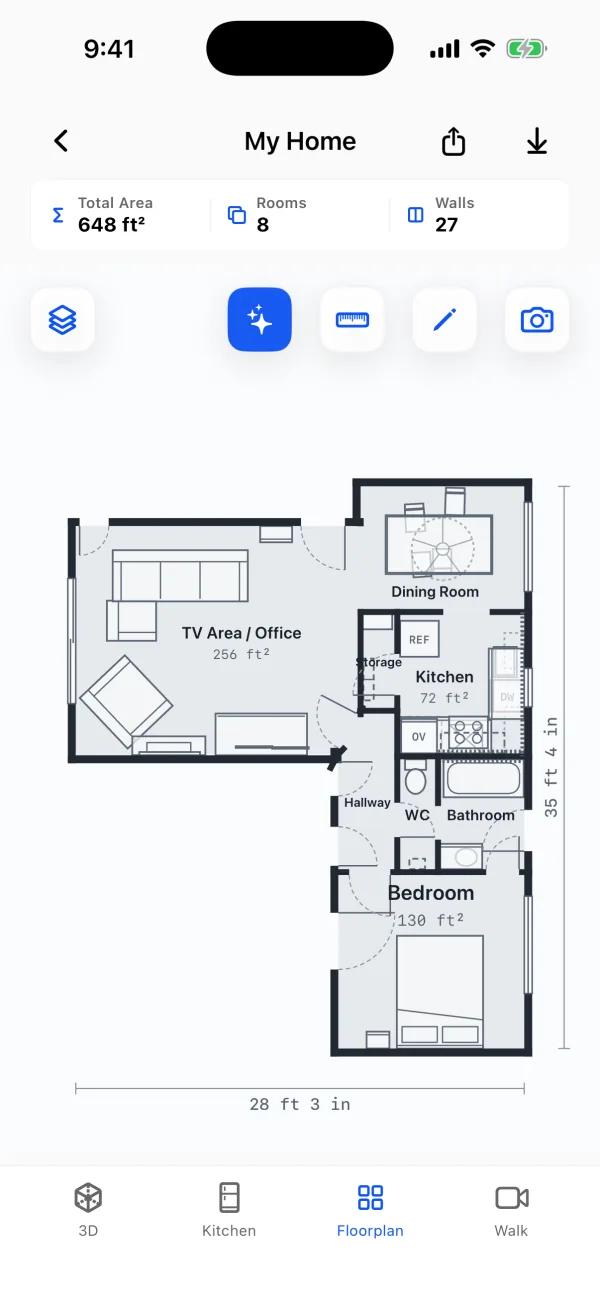
Apple built RoomPlan for rooms up to 30 by 30 feet and whole single-floor homes up to about 2,000 square feet; scan a bigger or multi-story house floor by floor.[2][3]
How accurate is iPhone square footage?
Close enough to plan, buy and bid from. In a 2026 peer-reviewed study, an app on the same Apple RoomPlan technology as PlaceAnew found all 8 rooms of a house, and its total room area came within about 5% of a terrestrial laser scanner.[4] It measured slightly less than the laser, not more. In our own office, PlaceAnew put the office at 195 sq ft against 197 sq ft on a hand-measured plan.[5]
Light matters: Apple recommends at least 50 lux and names full-height mirrors and glass as hard cases for LiDAR.[2] PlaceAnew draws a wall it could not see as a dashed line, filled in from what it did see, and Walk replays your visit so you can look at that corner again without going back.
Room square footage is not the same as a home's listed square footage
Adding up room areas gives you the floor inside the walls: what you carpet, paint around and furnish. The square footage on an appraisal is gross living area, measured from the exterior dimensions of each floor, so it is bigger than the sum of the rooms.[6] Both are right; they answer different questions. See which square footage a floor plan shows.
Questions about measuring with an iPhone
Does the iPhone Measure app calculate square footage?
Not directly. Apple describes Measure as a way to measure nearby objects: it finds the dimensions of rectangular objects or measures between two points you set, and says the measurements are approximate.[1] For a rectangular room, multiply length by width yourself; for the area of every room at once, scan it.
Can I measure square footage on an iPhone without LiDAR?
You can measure single lengths with the Measure app and multiply them yourself. Scanning a whole room into a floor plan needs the LiDAR Scanner in iPhone 12 Pro or a newer Pro model, or an iPad Pro from 2020 or later.
Does it count closets and hallways?
Every room PlaceAnew finds gets its own area, hallways and bathrooms included. If two spaces should be one, or a name is wrong, fix it in the editor: move a wall or rename the room.
How long does a scan take?
A typical room takes a minute or two. A whole floor takes as long as walking calmly through every room.
Need materials too? The guide to estimating materials from a floor plan turns room areas into flooring, paint and trim.
Sources
- Measure dimensions with iPhone. Apple, 2026. Official documentation.
- Create parametric 3D room scans with RoomPlan (WWDC22 session 10127). Apple Developer, June 2022. Official documentation.
- Explore enhancements to RoomPlan (WWDC23 session 10192). Apple Developer, June 2023. Official documentation.
- A Comparative Study of Mobile Device and Terrestrial Laser Scanning-Based Scan-to-BIM Workflows (Ersoz and Bosché). ISARC 2026 proceedings, IAARC, 2026. Peer-reviewed study.
- PlaceAnew office check, November 2026 (raw data, CSV). PlaceAnew, November 8, 2026. Our own measurement.
- Why Do Square Footage Disputes Arise?. National Association of REALTORS® (REALTOR® Magazine / NAR REALTOR® News), May 1, 2021. News report.
Last reviewed November 8, 2026 by the PlaceAnew team at US Construction Remodeling Corp., a licensed California contractor (CSLB License #1117562).